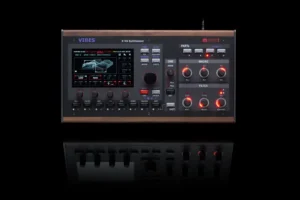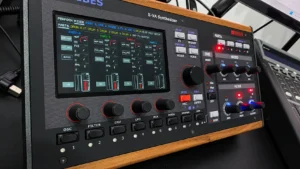

Aurora, Firmware 5.0, is a free update for every MD850 Vibes, and it is the largest one we have ever shipped. Three features lead it: a second studio-grade reverb that runs alongside the reverb you already use, a per-voice Vintage Mode that stops every voice from sounding identical, and SFZ multisample import that turns your old sample libraries into playable oscillators inside the XVA engine. Around those sit 335+ new sounds in six packs, a reworked factory library, and a long list of engine, workflow and controller improvements musicians have been asking for.
The MD850 Vibes keeps its existing reverb. Aurora adds a second one right next to it: the Cloud Reverb, a full algorithmic reverb engine you can run in parallel with what you already use. It was not built to be a general-purpose reverb. It was built to do one thing extremely well: turn simple sounds into huge, moving, endless spaces.
It is two reverbs, not one. The left and right channels each run their own complete reverb engine. A single Cross Seed control decides how differently the two sides are built, so halls open into true stereo width that comes from the room itself, not from a widener stage, while plates and rooms stay focused and mono-compatible.
The tail is built from many voices. The late reverb is a network of parallel, individually modulated delay lines, each with its own diffusion stage inside the feedback loop. The tail gets denser with every pass instead of turning metallic. No ringing, no flutter, no grain, just a smooth cloud of reflections.
Everything moves. Delay lines and diffusers are modulated independently, at rates and depths randomized per preset. That constant micro-motion is what made the great studio reverbs of the 1980s sound alive, and it lets a static pad breathe with no chorus or ensemble in the chain.
It decays like air. High and low shelving filters sit inside the feedback path, so every trip around the loop takes a little top end away. Highs fade first, lows linger, the way sound behaves in a real space.
Early and late are separate. The early reflections and the late tail have their own mix levels. Push the early reflections for placement and body, push the tail for wash, or combine both for a space with an actual wall and an actual distance.
It goes long. Decay reaches from a few hundred milliseconds to almost a minute. At the far end the reverb stops being an effect and becomes a sound source of its own: freeze pads, infinite drones, shimmer beds.
Aurora ships with 26 Cloud Reverb presets, each a complete configuration of the engine, tagged by size so you always know what you are reaching for:
Every preset carries its deep settings inside it, so you never have to touch the seeds, the delay-line count, the diffusion depth, the modulation or the damping curve unless you want to.
Beyond the preset, you get the eight controls that matter while you play:
Load a plate, pull the Early Mix up and the Late Mix down, and you have a drum room. Load a hall, push the Late Mix and set Decay to maximum, and the Vibes becomes a drone instrument. Same engine, same eight controls.
A digital polysynth plays every voice identically. That is precise, and it is also why a stacked chord can sound like one big voice instead of eight. Vintage Mode is how the MD850 Vibes breaks that symmetry.
Every voice on a classic analog poly was its own circuit board, with its own slightly wrong oscillators and its own slightly different filter. Vintage Mode recreates that per-voice character. A profile stores a table of eight voice slots, and for each slot a set of small offsets: pitch of oscillator 1, pitch of oscillator 2, pitch of the noise source, cutoff of filter A, cutoff of filter B, and pan. As voices are allocated, each one gets its own row from the table. Two notes never start from the same place, and a held chord spreads out the way it does on a real voice-card synth. One Amount control scales the whole profile, from a hint of instability to clearly out of tune.
The first four are the core set: one voice-spread character offered at three intensities, plus a stereo variant.
Because the three intensities share one character, you can move between them without the sound changing personality, only how far it has drifted. Think of them as fixed positions on a single “how old is this synth” control.
The twelve signature profiles each start from a different idea of what a vintage instrument does wrong, and in every one all six parameters are set for all eight voices, so filter and noise sounds get the treatment too.
Load a profile, turn Amount up until it sounds wrong, then back it off a little. That is where the good stuff is.
Somewhere on a drive you have a folder of samples you paid good money for. Tine pianos, string machines, choirs, that one drum kit. Aurora gives them a second life inside the MD850 Vibes.
The Vibes now imports SFZ multisamples and loads them into the noise oscillator. SFZ is the open, text-based multisample standard the whole industry can read, and free converters turn practically any legacy sampler format into it. The workflow is three steps: convert, copy to the Vibes, load. Once loaded, the multisample behaves like any other oscillator source. Every zone plays from its own root key, so a tine piano sampled every fifth key stays a tine piano across the whole keyboard instead of a chipmunk at the top and a tape drag at the bottom. Loop points come along, so sustaining samples hold as long as you hold the key.
Loading a multisample into the noise oscillator means it enters the Vibes at the same point as any other waveform, before everything that makes the Vibes sound the way it does. The sample runs through the analog-style filters, the envelopes, the modulation matrix, Vintage Mode and the effects, including the new Cloud Reverb. That changes what a sample is. A dry 1980s string-machine multisample plus DcoCalm plus a slow filter envelope plus a concert hall is not a playback of an old library. It is a new instrument that happened to be born from one. Layer it against the Vibes’ own oscillators, detune it, run it through Vintage Mode so every voice plays the sample a little differently, and the sample stops sounding like a sample.
The multisample oscillator itself has been refined for Aurora: note starts are synchronised with the envelopes, retriggered voices crossfade instead of cutting, and edge cases that could produce an audible click have been removed. Existing multisamples in the legacy format keep working.
Point a converter at your old sampler formats and let it write SFZ with the samples alongside. Keep one multisample per folder, copy the folder to the Vibes, and load it into the noise oscillator from the file browser. Start with something simple, a single-layer piano or a string machine, and build a patch around it before you drag in the whole library.
Aurora ships with 335+ new sounds in six packs. Four of them, 260+ sounds in total, come from Drey Andersson; two are guest soundbanks from external designers. Every pack shows up as its own folder in the preset browser, and the browser now opens on the Featured filter so the new material is the first thing you see.
On top of that, the original factory soundbank was reworked from the ground up [optional: more than 380 patches, confirm number before publishing] so the whole library plays to the standard of the new engine features, Vintage Mode and Cloud Reverb.
Modulation matrix, new targets. The matrix can now modulate the effects: the reverbs, the stereo delay, the modulated delay, the DJ filter and the ladder filter, among others. Route an LFO to reverb decay, an envelope to delay feedback, velocity to a filter sweep, and the effects become part of the patch instead of something bolted onto the end. The noise oscillator’s pan is a new target too, so sample-based sounds can move in the stereo field under modulation.
Two new arpeggiator modes. SKIP advances the pattern by one step, RESET jumps back to the beginning. Both are meant to be played, not set: hit them in time and the arpeggio stutters or restarts on cue.
Pitch bend for the noise oscillator. With multisamples living in the noise oscillator, it now bends with everything else.
Phaser rate with real resolution. The phaser rate runs from 0.001 Hz to 20 Hz in 1000 steps. At the bottom that is a sweep that takes over fifteen minutes; at the top it is a ring-mod-style flutter. Everything in between is reachable without jumping.
Finer delay time on the stereo delay. The stereo delay has finer resolution, which matters most for short, tuned delays and for dialing exact rhythmic values by ear.
Step sequencer, pan per step. Every step has its own pan. Bounce a hi-hat left and right, walk a bassline across the field, or write stereo movement into a sequence without touching a modulation source.
FX load meter. The FX load bargraph now shows the CPU load of each individual effect, the load per part and the total. When you stack a cathedral on all four parts, you can see exactly where the headroom went.
The Clip Launcher has been reworked to make recording and live looping feel immediate. Hit an empty slot in an armed Track, and the Vibes creates the clip and starts recording right away; hit it again, and that take becomes the loop. No complex setup, before you can play into it, just hit and go.
Overdubbing works the same simple way. Play a clip in an armed track, play on top of it, and your notes are added to what’s already there. Building up a drum pattern, stacking a second voice onto a chord progression, or dropping in a fill on the fourth pass is just a matter of playing.
Automation recording is built in too. Move a knob while a clip is running and that movement becomes part of the performance, filter sweeps, reverb rides, effect tweaks, all captured alongside the notes.
A metronome keeps you locked to the beat, so you’re always recording in time.
The piano roll has been improved to support all of this while you play: it now scrolls live with the playhead during recording and playback, so you can see exactly where you are without losing your place.
The Vibes has always supported any class-compliant MIDI controller, taught in to change parameters. Aurora’s new integration goes a level deeper: dedicated USB MIDI Plugins that let supported pad controllers interact with the Vibes the way a controller integrates with a DAW plugin, reaching well past parameters and simple notes.
The drum sequencer becomes editable from the pads: set triggers, adjust accents, pan samples, mute instruments, or shift steps to build polyrhythms on the fly.
The Clip Launcher opens up beyond starting and stopping clips and scenes. Quick editing, adding, moving, copying and deleting clips, happens right from the controller.
Drum mode puts the pads directly on the selected track, so you can play drums live without touching the front panel.
Even the mixer is reachable straight from the pad grid.
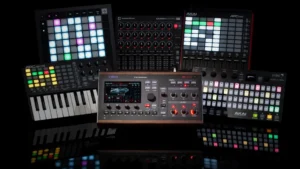
Aurora adds dedicated USB MIDI Plugins for four controllers:
If you run the Vibes as a 4-part SynthStation and wanted hands-on control without a computer, this is it.
VibesConnect was already introduced with Version 4.0, but Aurora brings a long list of small improvements that push it closer to a DAW-like workflow with the Vibes.
Just connect from any common web browser over LAN or Wi-Fi and you’re ready to go. PC, Mac or tablet, it doesn’t matter, there are no drivers and no software to install.
MIDI file import has been improved with drag and drop, making the workflow even more fluid, with the loop length detected automatically so imported clips land on the grid at the right length.
A new SFZ multisample import editor lets you bring your own sample libraries in and load them straight into the Vibes.
The new Info Center keeps you up to date and makes it easy to browse through all the available sound packs. Installation is a few clicks away, downloading the library straight from the internet.
The whole UI has moved to a dark design that’s easier on the eyes on stage and in a dim studio, and it now carries part colours throughout, popup captions pick up the colour of the part they belong to, so you always know at a glance which part you’re editing. Usage gets more intuitive across the board: lists of presets, samples and profiles now scroll via touch and drag, and tighter integration with the physical buttons speeds up editing tasks like drum sequences.
The four new packs, FM Legacy, Mayer Collection V1, Ethnic V1 and Analog, 260+ sounds in total, were designed by Drey Andersson, a Berlin-based sound designer and producer, who also reworked the original factory soundbank and designed the majority of the Cloud Reverb presets and the sixteen Vintage Mode profiles, including all twelve signature profiles. KeysNSynths (40 sounds) was designed by Davide Puxeddu, Chameleon (32 sounds) by Synthmill. Additional presets and profiles were contributed by the Mayer EMI team.
“When I first got the Vibes I could tell there was a lot more under the hood than the front panel lets on. I’ve spent years deep inside wavetable synths, so I know what a wavetable engine can do when you push it, and building these sounds was about showing exactly that. “ – Drey Andersson
Aurora, MD850 Vibes Firmware 5.0, is available now as a free update for every MD850 Vibes. [update instructions here]
Turn it on, load a hall, dial in JumpCards, drop your favorite old string machine into the noise oscillator, and tell us what you make.
Is Aurora free? Yes. Aurora (Firmware 5.0) is a free update for every MD850 Vibes.
Does Cloud Reverb replace the existing reverb? No. Cloud Reverb is a second, full reverb engine that runs alongside the reverb you already have.
What is Vintage Mode? A per-voice character system with 16 profiles (4 core and 12 signature) that gives each voice slightly different pitch, filter and pan, so chords spread like a real voice-card polysynth.
What sample formats can I import? SFZ multisamples, which load into the noise oscillator. Free converters turn most legacy sampler formats into SFZ.
Which controllers are supported? Akai Fire, Akai APC Key 25, Akai APC Mini and APC Mini MK2, and Novation Launchpad, each with a dedicated profile. Any class-compliant USB MIDI controller works as a generic device.
How many new sounds are there? 335 new sounds in six packs, plus a reworked factory soundbank and 26 Cloud Reverb presets.